
16 KiB
🚀 Cursor 免费试用重置工具



⚡️【限时特惠】Cursor 高额度成品号
🔥 独享专属 | 稳定30天 | 非破解试用
💡 仅需 ¥65 即可获得 $65+ 使用价值!
| 套餐 | 🇨🇳 人民币 | 🇺🇸 美元 | 官方价 | 可用总价值* | |
|---|---|---|---|---|---|
| 1️⃣ | Pro 🔥 爆款 |
¥65 | $10 | $20 | $20 基础 + 奖励 + 透支 ≈ $45–$65 |
| 2️⃣ | Pro+ | ¥265 | $40 | $60 | $70 基础 + 奖励 + 透支 ≈ $95–$130 |
| 3️⃣ | Ultra 👑 | ¥888 | $140 | $200 | $400+ 基础 + 海量奖励 ≈ $400+ |
| 🎁 | 半月卡 🏷️ 限量 |
¥488 | $70 | — | 1000次 + $20 ≈ 比Ultra更耐用 |
| 🆕 | Cursor 试用号 | — | $1 | — | 保证可用,批量优惠 |
| 🆕 | Gemini 3.0 Pro | ¥85 | $12 | — | 稳定谷歌老号,质保3天 |
📖 官网定价文档
ℹ️ 价值说明:总价值 = Base Credits(基础额度)+ Rewards(奖励)+ Overdraft(透支),每月重置。
💳 Cursor 普号说明
✓ 保证可用
🔑 发货格式
账号 ---- Cursor密码 ---- 邮箱密码 ---- 长效cookies⚠️ 质保说明 质保到手,请在1小时内检查并反馈,超时不提供售后
🔗 登录地址 Cursor: cursor.com (直登账号)
💎 Gemini 3.0 Pro 一年订阅说明
📦 商品描述 本商品质保三天,吊打全网垃圾短效邮箱,全是超级稳定的谷歌号注册,注册起码半年 1年以上,超级牛逼,开GCP拿这种号都没问题。不要拿几十块钱的、两天就不能用的跟这个相比,还是那句话:吊打全网垃圾质保首登,没得比。
🔑 账号格式
账号----密码----辅助邮箱----2fa⚠️ 使用须知
- 登录后:第一时间绑定自己的辅助邮箱、密码以及手机号码等。
- 切忌:三天内尽量保持使用同一个IP登录。
🔥 [新品] Cursor 商业绝版官方独享次数号 - 1000次+20刀
比 $200/Ultra 套餐更耐用!自行体验!
- 服务内容: Cursor 官网商业版会员 - 14天用完就删号
- 14天独享: 个人独享商业官方次数号,包含 1000次 快速请求额度 + $20 模型调用额度。
- 计费规则: 先消耗次数,次数用完后还可以额外消耗 $20 余额。需注意Max模型扣除次数较多。无慢速无限模式。
- 全功能开放: 所有模型均可使用,无功能限制。
- 官方授权: 保证官方账号,全程质保,按天售后。额度用完可续充!
⚠️ 购买须知:正规真金充值,独享账号 | 有效期 25–30 天 | 建议≤3台设备 | 7 天质保(换号 / 按天退款)
📱 联系方式:Telegram: @yuaotian | WeChat: JavaRookie666
📢 招聘广告位
🔥 广告位招租 - 欢迎联系洽谈合作
📧 联系方式:Telegram @yuaotian | WeChat:
JavaRookie666
⚠️ 重要提示
本工具当前支持版本:
- ✅ Windows: 最新的 2.x.x 版本(已支持)
- ✅ Mac/Linux: 最新的 2.x.x 版本(已支持,欢迎测试并反馈问题)
使用前请确认您的 Cursor 版本。
🚀 系统支持
|
Windows ✅
|
macOS ✅
|
Linux ✅
|
🚀 一键解决方案
国内用户(推荐)
macOS
curl -fsSL https://wget.la/https://raw.githubusercontent.com/yuaotian/go-cursor-help/refs/heads/master/scripts/run/cursor_mac_id_modifier.sh -o ./cursor_mac_id_modifier.sh && sudo bash ./cursor_mac_id_modifier.sh && rm ./cursor_mac_id_modifier.sh
Linux
curl -fsSL https://wget.la/https://raw.githubusercontent.com/yuaotian/go-cursor-help/refs/heads/master/scripts/run/cursor_linux_id_modifier.sh | sudo bash
Linux 用户请注意: 该脚本通过检查常用路径(
/usr/bin,/usr/local/bin,$HOME/.local/bin,/opt/cursor,/snap/bin)、使用which cursor命令以及在/usr、/opt和$HOME/.local目录内搜索,来尝试定位您的 Cursor 安装。如果 Cursor 安装在其他位置或通过这些方法无法找到,脚本可能会失败。请确保可以通过这些标准位置或方法之一访问到 Cursor。
Windows
irm https://wget.la/https://raw.githubusercontent.com/yuaotian/go-cursor-help/refs/heads/master/scripts/run/cursor_win_id_modifier.ps1 | iex
缓存提示(Windows): 如果镜像/代理缓存导致拉到旧脚本,可在 URL 末尾追加时间戳参数绕缓存(推荐 raw + 时间戳):
irm "https://raw.githubusercontent.com/yuaotian/go-cursor-help/refs/heads/master/scripts/run/cursor_win_id_modifier.ps1?$(Get-Date -Format yyyyMMddHHmmss)" | iex
如果必须继续使用 wget.la 镜像,同样可以在镜像 URL 末尾追加时间戳参数:
irm "https://wget.la/https://raw.githubusercontent.com/yuaotian/go-cursor-help/refs/heads/master/scripts/run/cursor_win_id_modifier.ps1?$(Get-Date -Format yyyyMMddHHmmss)" | iex
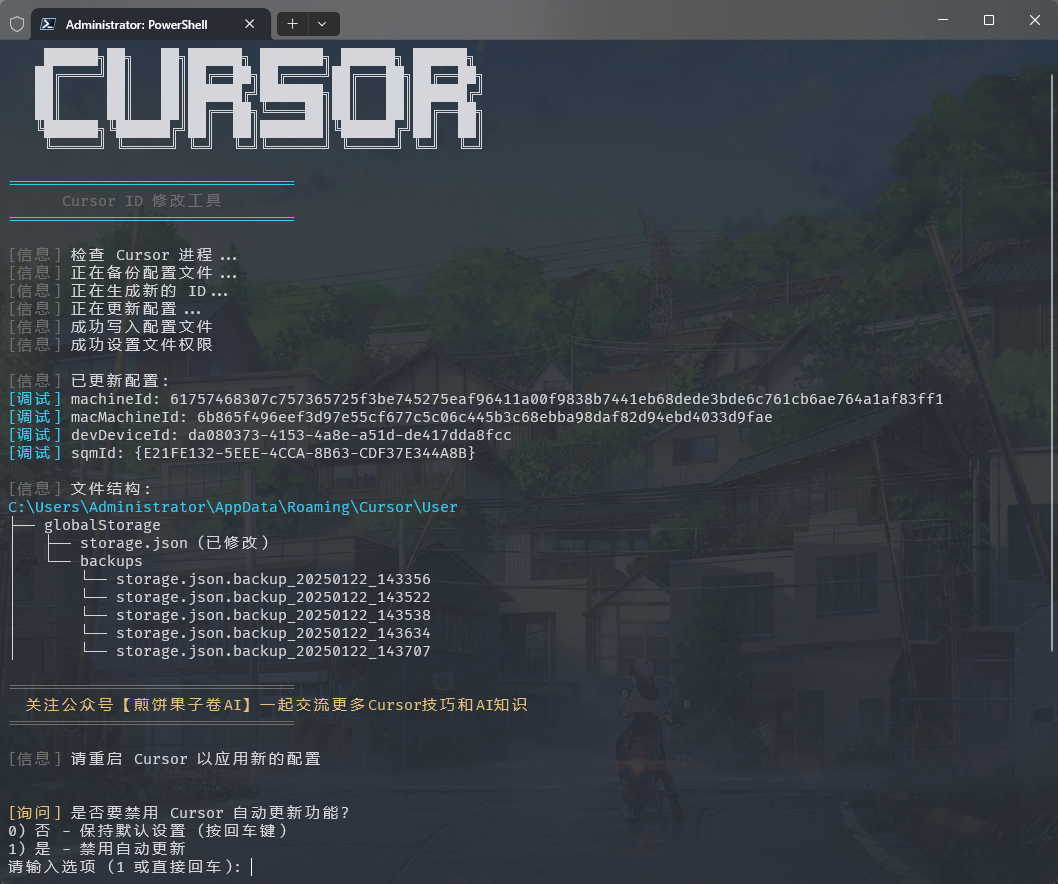
Windows 管理员终端运行和手动安装
Windows 系统打开管理员终端的方法:
方法一:使用 Win + X 快捷键
1. 按下 Win + X 组合键
2. 在弹出的菜单中选择以下任一选项:
   - "Windows PowerShell (管理员)"
   - "Windows Terminal (管理员)"
   - "终端(管理员)"
   (具体选项因Windows版本而异)
方法二:使用 Win + R 运行命令
1. 按下 Win + R 组合键
2. 在运行框中输入 powershell 或 pwsh
3. 按 Ctrl + Shift + Enter 以管理员身份运行
   或在打开的窗口中输入: Start-Process pwsh -Verb RunAs
4. 在管理员终端中输入以下重置脚本:

irm https://wget.la/https://raw.githubusercontent.com/yuaotian/go-cursor-help/refs/heads/master/scripts/run/cursor_win_id_modifier.ps1 | iex
增强版脚本:
irm https://wget.la/https://raw.githubusercontent.com/yuaotian/go-cursor-help/refs/heads/master/scripts/run/cursor_win_id_modifier.ps1 | iex
方法三:通过搜索启动
在搜索框中输入 pwsh,右键选择"以管理员身份运行"
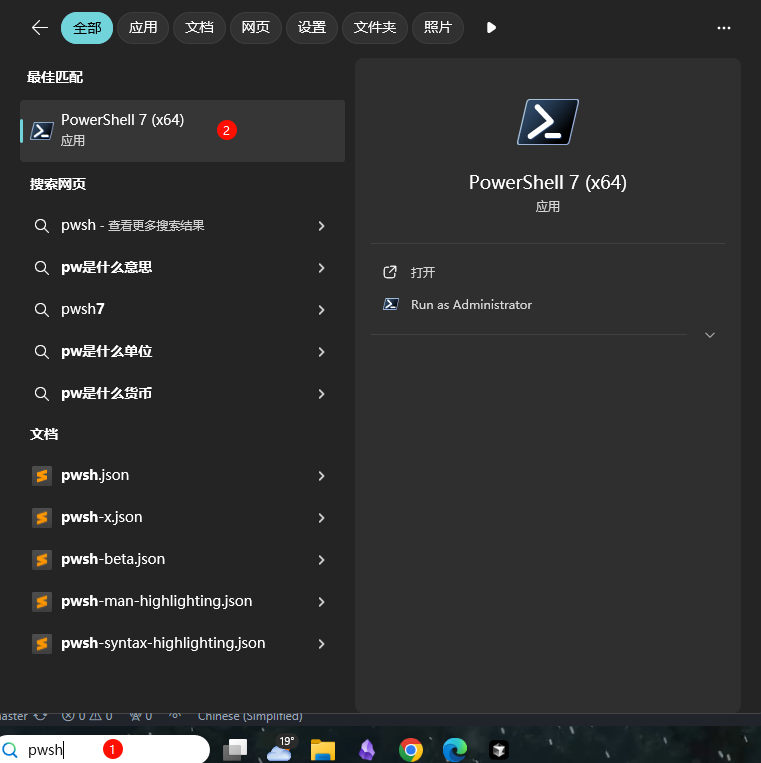
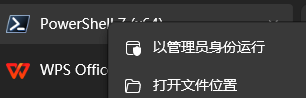
在管理员终端中输入重置脚本:
irm https://wget.la/https://raw.githubusercontent.com/yuaotian/go-cursor-help/refs/heads/master/scripts/run/cursor_win_id_modifier.ps1 | iex
增强版脚本:
irm https://wget.la/https://raw.githubusercontent.com/yuaotian/go-cursor-help/refs/heads/master/scripts/run/cursor_win_id_modifier.ps1 | iex
🔧 PowerShell 安装指南
如果您的系统没有安装 PowerShell,可以通过以下方法安装:
方法一:使用 Winget 安装(推荐)
- 打开命令提示符或 PowerShell
- 运行以下命令:
winget install --id Microsoft.PowerShell --source winget
方法二:手动下载安装
-
下载对应系统的安装包:
- PowerShell-7.4.6-win-x64.msi (64位系统)
- PowerShell-7.4.6-win-x86.msi (32位系统)
- PowerShell-7.4.6-win-arm64.msi (ARM64系统)
-
双击下载的安装包,按提示完成安装
💡 如果仍然遇到问题,可以参考 Microsoft 官方安装指南
Windows 安装特性:
- 🔍 自动检测并使用 PowerShell 7(如果可用)
- 🛡️ 通过 UAC 提示请求管理员权限
- 📝 如果没有 PS7 则使用 Windows PowerShell
- 💡 如果提权失败会提供手动说明
完成后,脚本将:
- ✨ 自动安装工具
- 🔄 立即重置 Cursor 试用期
📦 手动安装
从 releases 下载适合您系统的文件
Windows 安装包
- 64 位:
cursor-id-modifier_windows_x64.exe - 32 位:
cursor-id-modifier_windows_x86.exe
macOS 安装包
- Intel:
cursor-id-modifier_darwin_x64_intel - M1/M2:
cursor-id-modifier_darwin_arm64_apple_silicon
Linux 安装包
- 64 位:
cursor-id-modifier_linux_x64 - 32 位:
cursor-id-modifier_linux_x86 - ARM64:
cursor-id-modifier_linux_arm64
🔧 技术细节
注册表修改说明
⚠️ 重要提示:本工具会修改系统注册表
修改内容
- 路径:
计算机\HKEY_LOCAL_MACHINE\SOFTWARE\Microsoft\Cryptography - 项目:
MachineGuid
潜在影响
修改此注册表项可能会影响:
- Windows 系统对设备的唯一标识
- 某些软件的设备识别和授权状态
- 基于硬件标识的系统功能
安全措施
-
自动备份
- 每次修改前会自动备份原始值
- 备份保存在:
%APPDATA%\Cursor\User\globalStorage\backups - 备份文件格式:
MachineGuid.backup_YYYYMMDD_HHMMSS
-
手动恢复方法
- 打开注册表编辑器(regedit)
- 定位到:
计算机\HKEY_LOCAL_MACHINE\SOFTWARE\Microsoft\Cryptography - 右键点击
MachineGuid - 选择"修改"
- 粘贴备份文件中的值
注意事项
- 建议在修改前先确认备份文件的存在
- 如遇问题可通过备份文件恢复原始值
- 必须以管理员权限运行才能修改注册表
配置文件
程序修改 Cursor 的storage.json配置文件,位于:
- Windows:
%APPDATA%\Cursor\User\globalStorage\ - macOS:
~/Library/Application Support/Cursor/User/globalStorage/ - Linux:
~/.config/Cursor/User/globalStorage/
修改字段
工具会生成新的唯一标识符:
telemetry.machineIdtelemetry.macMachineIdtelemetry.devDeviceIdtelemetry.sqmId
手动禁用自动更新
Windows 用户可以手动禁用自动更新功能:
- 关闭所有 Cursor 进程
- 删除目录:
C:\Users\用户名\AppData\Local\cursor-updater - 创建同名文件:
cursor-updater(不带扩展名)
Linux用户可以尝试在系统中找到类似的cursor-updater目录进行相同操作。
MacOS用户按照以下步骤操作:
# 注意:经测试,此方法仅适用于0.45.11及以下版本,不支持0.46.*版本
# 关闭所有 Cursor 进程
pkill -f "Cursor"

# 备份app-update.yml并创建空的只读文件代替原文件
cd /Applications/Cursor.app/Contents/Resources
mv app-update.yml app-update.yml.bak
touch app-update.yml
chmod 444 app-update.yml

# 打开Cursor设置,将更新模式设置为"无",该步骤必须执行,否则Cursor依然会自动检查更新
# 步骤:Settings -> Application -> Update, 将Mode设置为none

# 注意: cursor-updater修改方法可能已失效。但为了以防万一,还是删除更新目录并创建阻止文件
rm -rf ~/Library/Application\ Support/Caches/cursor-updater
touch ~/Library/Application\ Support/Caches/cursor-updater
安全特性
- ✅ 安全的进程终止
- ✅ 原子文件操作
- ✅ 错误处理和恢复
重置 Cursor 免费试用
使用 cursor_free_trial_reset.sh 脚本
macOS
curl -fsSL https://raw.githubusercontent.com/yuaotian/go-cursor-help/refs/heads/master/scripts/run/cursor_free_trial_reset.sh -o ./cursor_free_trial_reset.sh && sudo bash ./cursor_free_trial_reset.sh && rm ./cursor_free_trial_reset.sh
Linux
curl -fsSL https://raw.githubusercontent.com/yuaotian/go-cursor-help/refs/heads/master/scripts/run/cursor_free_trial_reset.sh | sudo bash
Windows
irm https://raw.githubusercontent.com/yuaotian/go-cursor-help/refs/heads/master/scripts/run/cursor_free_trial_reset.sh | iex
联系方式
个人微信 微信:JavaRookie666 |
微信交流群 二维码7天内(11月25日前)有效,过期请加微信或者公众号`煎饼果子卷AI` |
公众号 获取更多AI开发资源 |
微信赞赏 要到饭咧?啊咧?啊咧?不给也没事~ 请随意打赏 |
支付宝赞赏 如果觉得有帮助,来包辣条犒劳一下吧~ |
💳 付款方式(捐赠)
- 🪙 USDT(泰达币)
- 🔴 TRC-20(波场):
TFbJnoY5Lep5ZrDwBbT8rV1i8xR4ZhX53k - 🟡 Polygon / BSC / Arbitrum:
0x44f8925b9f93b3d6da8d5ad26a3516e3e652cc88
- 🔴 TRC-20(波场):
- 🟦 莱特币(LTC):
LVrigKxtWfPymMRtRqL3z2eZxfncR3dPV7
📚 推荐阅读
💬 反馈与建议
我们非常重视您对新增强脚本的反馈!如果您已经尝试了 cursor_win_id_modifier.ps1 脚本,请分享您的使用体验:
- 🐛 错误报告:发现任何问题?请告诉我们!
- 💡 功能建议:有改进想法?
- ⭐ 成功案例:分享工具如何帮助到您!
- 🔧 技术反馈:性能、兼容性或易用性方面的见解
您的反馈帮助我们为所有人改进工具。欢迎提交issue或为项目做出贡献!
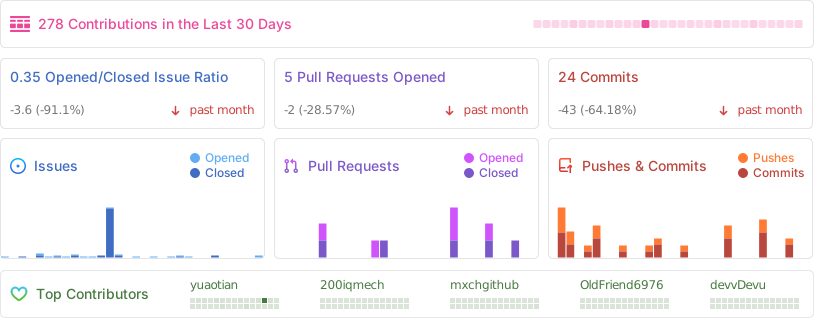
⭐ 项目统计
📄 许可证
MIT 许可证
Copyright (c) 2024
Permission is hereby granted, free of charge, to any person obtaining a copy of this software and associated documentation files (the "Software"), to deal in the Software without restriction, including without limitation the rights to use, copy, modify, merge, publish, distribute, sublicense, and/or sell copies of the Software, and to permit persons to whom the Software is furnished to do so, subject to the following conditions:
The above copyright notice and this permission notice shall be included in all copies or substantial portions of the Software.