# ๐Ÿš€ Cursor Free Trial Reset Tool
[![Release](https://img.shields.io/github/v/release/yuaotian/go-cursor-help?style=flat-square&logo=github&color=blue)](https://github.com/yuaotian/go-cursor-help/releases/latest) [![License](https://img.shields.io/badge/license-MIT-blue.svg?style=flat-square&logo=bookstack)](https://github.com/yuaotian/go-cursor-help/blob/master/LICENSE) [![Stars](https://img.shields.io/github/stars/yuaotian/go-cursor-help?style=flat-square&logo=github)](https://github.com/yuaotian/go-cursor-help/stargazers) [๐ŸŒŸ English](README.md) | [๐ŸŒ ไธญๆ–‡](README_CN.md) | [๐ŸŒ ๆ—ฅๆœฌ่ชž](README_JP.md) Cursor Logo
---
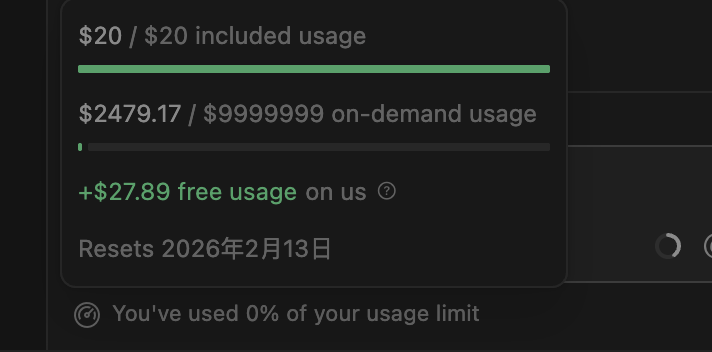
## โšก๏ธ [Flash Sale] Cursor Pro Highโ€‘Credit Accounts Private & Exclusive Legit Top-up Official Account > ๐Ÿ’ก Get **$65+** usage value for only **$12**! | ๐Ÿ“– [Official Pricing Reference](https://cursor.com/cn/docs/account/pricing)
### ๐Ÿ‘‘ NEW FLAGSHIP: Unlimited โ™พ๏ธ Official Account > **Truly Unlimited Credits (Display 99999) | Private Official Account | 10-Day Warranty** | ๐Ÿ’ฐ Price | ๐Ÿ’Ž Official Value | ๐Ÿ›ก๏ธ Validity | | :---: | :---: | :---: | | **$150** / ยฅ1050 | **$9,999,999** | **30 Days** | Unlimited
--- | Type | Plan | ๐Ÿ’ฐ Price | ๐Ÿ“Š Official | ๐Ÿ’Ž Total Value / Note | |:---:|:---|:---:|:---:|:---| | **๐Ÿ† Member** | **Pro** ๐Ÿ”ฅ `HOT` | $12 | $20 | โ‰ˆ **$45โ€“$65** (Base+Rewards+Overdraft) | | **๐Ÿ† Member** | **Unlimited โ™พ๏ธ** ๐Ÿ‘‘ `FLAGSHIP` | $150 | $99999999+โ™พ๏ธ | **Truly Unlimited** (Official Verified, 10-Day Warranty) | | **๐ŸŽฏ Limited** | **7-Day Pass $100** ๐Ÿท๏ธ | $30 | $100 | 7-Day Exclusive $100 Credit, Official Billing, Daily Support | | **๐ŸŽฏ Limited** | **7-Day Pass $500** ๐Ÿ’Ž | $150 | $500 | 7-Day Exclusive $500 Credit, High-Intensity Dev | | **๐ŸŽฏ Limited** | **7-Day Pass $1000** ๐Ÿ”ฅ | $350 | $1000 | 7-Day Exclusive $1000 Credit, Ultra-High Intensity | | **๐Ÿ†• Basic** | **Cursor Trial Acct** | **$3** /each | โ€” | Guaranteed working, Bulk discount | | **๐Ÿ†• Basic** | **Gemini 3.0 Pro** ๐Ÿ’Ž | $10 | โ€” | 1-Year Sub, Stable Google Acct, 3-Day Warranty | > โ„น๏ธ **Value Note**: Member plan total value = Base Credits + Rewards + Overdraft (monthly resets apply).
๐Ÿ“‹ Product Details (Click to expand)
--- #### ๐Ÿท๏ธ 7-Day Business Pass Series Details > **โš ๏ธ Important: The 7-Day Pass is valid for exactly 7 days (from delivery). Account auto-deleted upon expiration!** | Version | Credit | Price | Description | |:---|:---|:---|:---| | **$100 Pass** | $100 | **ยฅ210** / $30 | 7-Day Exclusive $100 Credit, Official Billing, Daily Support | | **$500 Pass** | $500 | **ยฅ1050** / $150 | 7-Day Exclusive $500 Credit, Best for High-Intensity Dev | | **$1000 Pass** | $1000 | **ยฅ2450** / $350 | 7-Day Exclusive $1000 Credit, Ultra-High Intensity Dev | | General Info | Content | |:---|:---| | **Service** | Cursor Official Business Member - 7-Day Weekly Pass | | **Official Benefits** | Private Exclusive Official Account, Full Access, No Speed Limit | | **Usage Limits** | Official usage-based billing, stops when credits depleted. BYO Network Accelerator required | --- #### ๐Ÿ’ณ Cursor Trial Account Details | Item | Description | |:---|:---| | **Delivery Format** | `Account ---- Cursor Password ---- Email Password ---- Long-term cookies` | | **Warranty** | Check within **1 hour** of receipt. No support after timeout | | **Login URL** | cursor.com (Direct Login) | --- #### ๐Ÿ’Ž Gemini 3.0 Pro Details | Item | Description | |:---|:---| | **Description** | 3-Day Warranty. Super stable Google accounts (6mo-1yr+). Quality far exceeds temporary email accounts. Suitable even for GCP | | **Account Format** | `Account----Password----Recovery Email----2FA` | | **Instructions** | โ‘  Immediately bind your own recovery email, password, and phone number after login โ‘ก **Important**: Keep using the same IP address for the first 3 days |
--- | โš ๏ธ **Before You Buy** | ๐Ÿ“ฑ **Contact** | |:---|:---| | ๐Ÿ’Ž Legit top-up, private account | [@yuaotian](https://t.me/yuaotian) | | โฑ๏ธ Valid 25โ€“30 days \| ๐Ÿ’ป Recommended โ‰ค3 devices | `JavaRookie666` | | ๐Ÿ›ก๏ธ 7-day warranty (replacement / pro-rated refund) | | --- ### ๐Ÿ“ข Advertising Space > ๐Ÿ”ฅ **Ad Space Available** - Contact for partnership opportunities > > ๐Ÿ“ง Contact: Telegram [@yuaotian](https://t.me/yuaotian) | WeChat: `JavaRookie666` ---
> โš ๏ธ **IMPORTANT NOTICE** > > This tool currently supports: > - โœ… Windows: Latest 2.x.x versions (Supported) > - โœ… Mac/Linux: Latest 2.x.x versions (Supported, feedback welcome) > > Please check your Cursor version before using this tool. --- ### ๐Ÿš€ One-Click Solution
Global Users **macOS** ```bash curl -fsSL https://raw.githubusercontent.com/yuaotian/go-cursor-help/refs/heads/master/scripts/run/cursor_mac_id_modifier.sh -o ./cursor_mac_id_modifier.sh && sudo bash ./cursor_mac_id_modifier.sh && rm ./cursor_mac_id_modifier.sh ``` **Linux** ```bash curl -fsSL https://raw.githubusercontent.com/yuaotian/go-cursor-help/refs/heads/master/scripts/run/cursor_linux_id_modifier.sh | sudo bash ``` > **Note for Linux users:** The script attempts to find your Cursor installation by checking common paths (`/usr/bin`, `/usr/local/bin`, `$HOME/.local/bin`, `/opt/cursor`, `/snap/bin`), using the `which cursor` command, and searching within `/usr`, `/opt`, and `$HOME/.local`. If Cursor is installed elsewhere or not found via these methods, the script may fail. Ensure Cursor is accessible via one of these standard locations or methods. **Windows** ```powershell irm https://raw.githubusercontent.com/yuaotian/go-cursor-help/refs/heads/master/scripts/run/cursor_win_id_modifier.ps1 | iex ``` **Tip (Windows):** If you suspect a cached old script (mirror/proxy cache), append a timestamp query parameter to bypass cache: ```powershell irm "https://raw.githubusercontent.com/yuaotian/go-cursor-help/refs/heads/master/scripts/run/cursor_win_id_modifier.ps1?$(Get-Date -Format yyyyMMddHHmmss)" | iex ```
China Users (Recommended) **macOS** ```bash curl -fsSL https://wget.la/https://raw.githubusercontent.com/yuaotian/go-cursor-help/refs/heads/master/scripts/run/cursor_mac_id_modifier.sh -o ./cursor_mac_id_modifier.sh && sudo bash ./cursor_mac_id_modifier.sh && rm ./cursor_mac_id_modifier.sh ``` **Linux** ```bash curl -fsSL https://wget.la/https://raw.githubusercontent.com/yuaotian/go-cursor-help/refs/heads/master/scripts/run/cursor_linux_id_modifier.sh | sudo bash ``` **Windows** ```powershell irm https://wget.la/https://raw.githubusercontent.com/yuaotian/go-cursor-help/refs/heads/master/scripts/run/cursor_win_id_modifier.ps1 | iex ``` **Tip (Windows):** If the mirror caches old content, append `?$(Get-Date -Format yyyyMMddHHmmss)` to the URL: ```powershell irm "https://wget.la/https://raw.githubusercontent.com/yuaotian/go-cursor-help/refs/heads/master/scripts/run/cursor_win_id_modifier.ps1?$(Get-Date -Format yyyyMMddHHmmss)" | iex ```
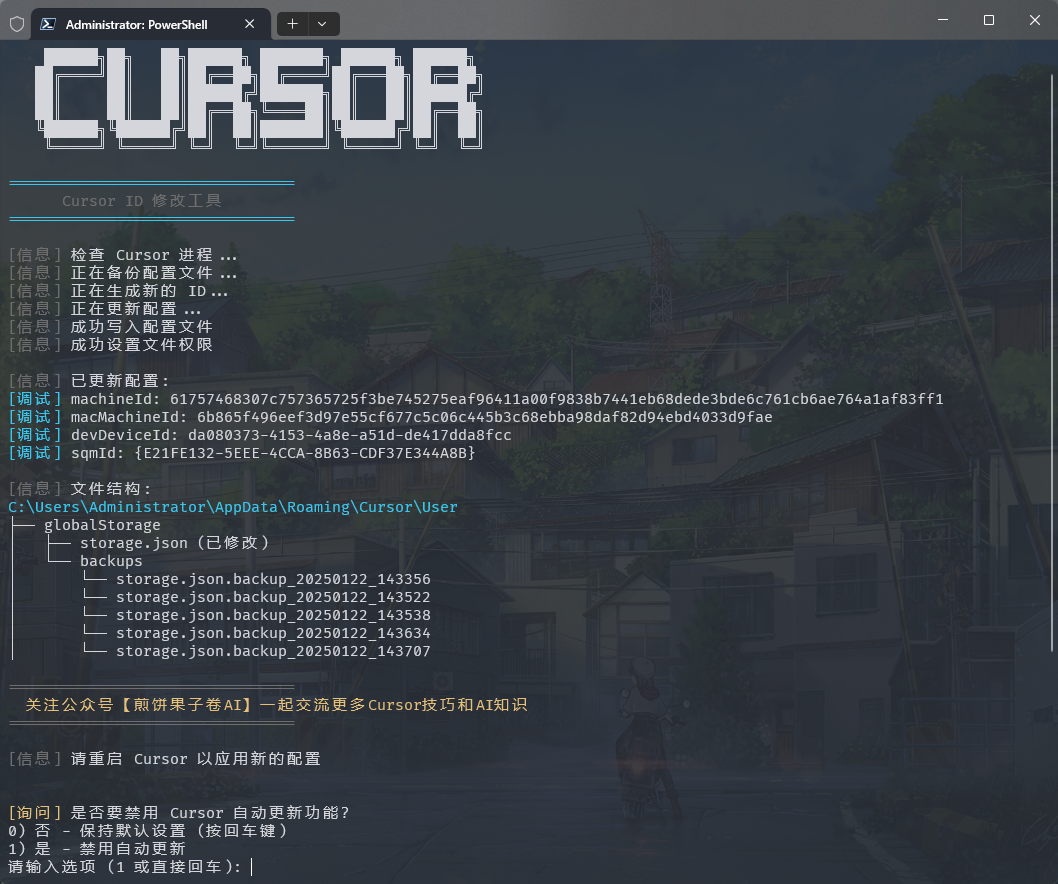
Run Success
Windows Terminal Run and Configuration #### How to Open Administrator Terminal in Windows: ##### Method 1: Using Win + X Shortcut ```md 1. Press Win + X key combination 2. Select one of these options from the menu: - "Windows PowerShell (Administrator)" - "Windows Terminal (Administrator)" - "Terminal (Administrator)" (Options may vary depending on Windows version) ``` ##### Method 2: Using Win + R Run Command ```md 1. Press Win + R key combination 2. Type powershell or pwsh in the Run dialog 3. Press Ctrl + Shift + Enter to run as administrator or type in the opened window: Start-Process pwsh -Verb RunAs 4. Enter the reset script in the administrator terminal: irm https://wget.la/https://raw.githubusercontent.com/yuaotian/go-cursor-help/refs/heads/master/scripts/run/cursor_win_id_modifier.ps1 | iex ``` For the enhanced version: ```powershell irm https://wget.la/https://raw.githubusercontent.com/yuaotian/go-cursor-help/refs/heads/master/scripts/run/cursor_win_id_modifier.ps1 | iex ``` ##### Method 3: Using Search >![Search PowerShell](img/pwsh_1.png) > >Type pwsh in the search box, right-click and select "Run as administrator" >![Run as Administrator](img/pwsh_2.png) Enter the reset script in the administrator terminal: ```powershell irm https://wget.la/https://raw.githubusercontent.com/yuaotian/go-cursor-help/refs/heads/master/scripts/run/cursor_win_id_modifier.ps1 | iex ``` For the enhanced version: ```powershell irm https://wget.la/https://raw.githubusercontent.com/yuaotian/go-cursor-help/refs/heads/master/scripts/run/cursor_win_id_modifier.ps1 | iex ``` ### ๐Ÿ”ง PowerShell Installation Guide If PowerShell is not installed on your system, you can install it using one of these methods: #### Method 1: Install via Winget (Recommended) 1. Open Command Prompt or PowerShell 2. Run the following command: ```powershell winget install --id Microsoft.PowerShell --source winget ``` #### Method 2: Manual Installation 1. Download the installer for your system: - [PowerShell-7.4.6-win-x64.msi](https://github.com/PowerShell/PowerShell/releases/download/v7.4.6/PowerShell-7.4.6-win-x64.msi) (64-bit systems) - [PowerShell-7.4.6-win-x86.msi](https://github.com/PowerShell/PowerShell/releases/download/v7.4.6/PowerShell-7.4.6-win-x86.msi) (32-bit systems) - [PowerShell-7.4.6-win-arm64.msi](https://github.com/PowerShell/PowerShell/releases/download/v7.4.6/PowerShell-7.4.6-win-arm64.msi) (ARM64 systems) 2. Double-click the downloaded installer and follow the installation prompts > ๐Ÿ’ก If you encounter any issues, please refer to the [Microsoft Official Installation Guide](https://learn.microsoft.com/en-us/powershell/scripting/install/installing-powershell-on-windows)
#### Windows ๅฎ‰่ฃ…็‰นๆ€ง: - ๐Ÿ” Automatically detects and uses PowerShell 7 if available - ๐Ÿ›ก๏ธ Requests administrator privileges via UAC prompt - ๐Ÿ“ Falls back to Windows PowerShell if PS7 isn't found - ๐Ÿ’ก Provides manual instructions if elevation fails That's it! The script will: 1. โœจ Install the tool automatically 2. ๐Ÿ”„ Reset your Cursor trial immediately ### ๐Ÿ“ฆ Manual Installation > Download the appropriate file for your system from [releases](https://github.com/yuaotian/go-cursor-help/releases/latest)
Windows Packages - 64-bit: `cursor-id-modifier_windows_x64.exe` - 32-bit: `cursor-id-modifier_windows_x86.exe`
macOS Packages - Intel: `cursor-id-modifier_darwin_x64_intel` - M1/M2: `cursor-id-modifier_darwin_arm64_apple_silicon`
Linux Packages - 64-bit: `cursor-id-modifier_linux_x64` - 32-bit: `cursor-id-modifier_linux_x86` - ARM64: `cursor-id-modifier_linux_arm64`
### ๐Ÿ”ง Technical Details
Configuration Files The program modifies Cursor's `storage.json` config file located at: - Windows: `%APPDATA%\Cursor\User\globalStorage\storage.json` - macOS: `~/Library/Application Support/Cursor/User/globalStorage/storage.json` - Linux: `~/.config/Cursor/User/globalStorage/storage.json`
Modified Fields The tool generates new unique identifiers for: - `telemetry.machineId` - `telemetry.macMachineId` - `telemetry.devDeviceId` - `telemetry.sqmId`
Manual Auto-Update Disable Windows users can manually disable the auto-update feature: 1. Close all Cursor processes 2. Delete directory: `C:\Users\username\AppData\Local\cursor-updater` 3. Create a file with the same name: `cursor-updater` (without extension) macOS/Linux users can try to locate similar `cursor-updater` directory in their system and perform the same operation.
Safety Features - โœ… Safe process termination - โœ… Atomic file operations - โœ… Error handling and recovery
Registry Modification Notice > โš ๏ธ **Important: This tool modifies the Windows Registry** #### Modified Registry - Path: `Computer\HKEY_LOCAL_MACHINE\SOFTWARE\Microsoft\Cryptography` - Key: `MachineGuid` #### Potential Impact Modifying this registry key may affect: - Windows system's unique device identification - Device recognition and authorization status of certain software - System features based on hardware identification #### Safety Measures 1. Automatic Backup - Original value is automatically backed up before modification - Backup location: `%APPDATA%\Cursor\User\globalStorage\backups` - Backup file format: `MachineGuid.backup_YYYYMMDD_HHMMSS` 2. Manual Recovery Steps - Open Registry Editor (regedit) - Navigate to: `Computer\HKEY_LOCAL_MACHINE\SOFTWARE\Microsoft\Cryptography` - Right-click on `MachineGuid` - Select "Modify" - Paste the value from backup file #### Important Notes - Verify backup file existence before modification - Use backup file to restore original value if needed - Administrator privileges required for registry modification
--- ### ๐Ÿ“š Recommended Reading - [Cursor Issues Collection and Solutions](https://mp.weixin.qq.com/s/pnJrH7Ifx4WZvseeP1fcEA) - [AI Universal Development Assistant Prompt Guide](https://mp.weixin.qq.com/s/PRPz-qVkFJSgkuEKkTdzwg) --- ## ๐Ÿ’ฌ Feedback & Suggestions We value your feedback on the new enhanced script! If you've tried the `cursor_win_id_modifier.ps1` script, please share your experience: - ๐Ÿ› **Bug Reports**: Found any issues? Let us know! - ๐Ÿ’ก **Feature Suggestions**: Have ideas for improvements? - โญ **Success Stories**: Share how the tool helped you! - ๐Ÿ”ง **Technical Feedback**: Performance, compatibility, or usability insights Your feedback helps us improve the tool for everyone. Feel free to open an issue or contribute to the project! --- ## Support
If you find this helpful, consider buying me a spicy gluten snack (Latiao) as appreciation~ ๐Ÿ’โ˜•๏ธ
ๅพฎไฟก่ตž่ต
ๅพฎไฟก่ตž่ต็ 
่ฆๅˆฐ้ฅญๅ’ง๏ผŸๅ•Šๅ’ง๏ผŸๅ•Šๅ’ง๏ผŸไธ็ป™ไนŸๆฒกไบ‹~ ่ฏท้šๆ„ๆ‰“่ต
ๆ”ฏไป˜ๅฎ่ตž่ต
ๆ”ฏไป˜ๅฎ่ตž่ต็ 
ๅฆ‚ๆžœ่ง‰ๅพ—ๆœ‰ๅธฎๅŠฉ,ๆฅๅŒ…่พฃๆก็Š’ๅŠณไธ€ไธ‹ๅง~
Alipay
Alipay
1 Latiao = 1 AI thought cycle
WeChat
WeChat
ไบŒ็ปด็ 7ๅคฉๅ†…(11ๆœˆ25ๆ—ฅๅ‰ๅ‰)ๆœ‰ๆ•ˆ๏ผŒ่ฟ‡ๆœŸ่ฏทๅŠ ๅพฎไฟกๆˆ–่€…ๅ…ฌไผ—ๅท`็…Ž้ฅผๆžœๅญๅทAI`
### ๐Ÿ’ณ Payment Methods (Donate / Remove Ads) - ๐Ÿช™ **USDT (Tether)** - ๐Ÿ”ด TRC-20 (Tron): `TFbJnoY5Lep5ZrDwBbT8rV1i8xR4ZhX53k` - ๐ŸŸก Polygon / BSC / Arbitrum: `0x44f8925b9f93b3d6da8d5ad26a3516e3e652cc88` - ๐ŸŸฆ **Litecoin (LTC)**: `LVrigKxtWfPymMRtRqL3z2eZxfncR3dPV7` --- ## โญ Project Stats
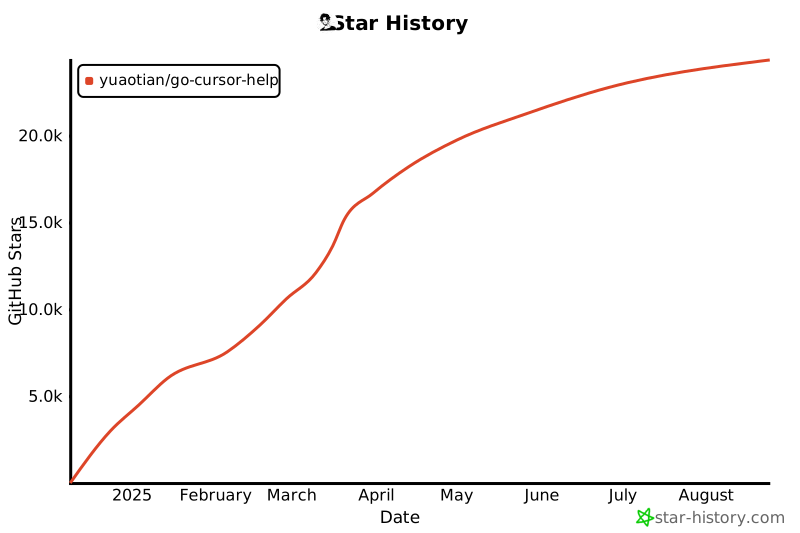
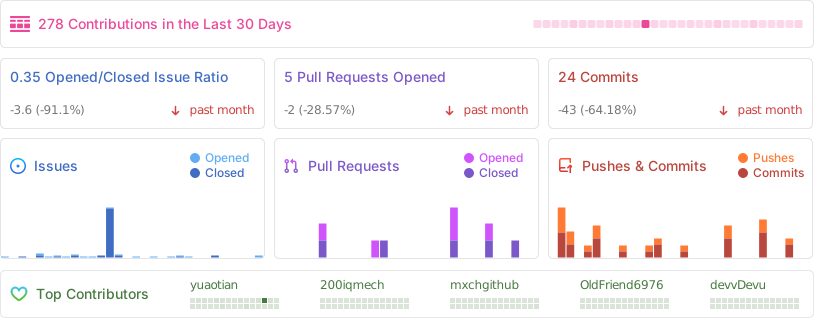
[![Star History Chart](https://api.star-history.com/svg?repos=yuaotian/go-cursor-help&type=Date)](https://star-history.com/#yuaotian/go-cursor-help&Date) ![Repobeats analytics image](https://repobeats.axiom.co/api/embed/ddaa9df9a94b0029ec3fad399e1c1c4e75755477.svg "Repobeats analytics image")
## ๐Ÿ“„ License
MIT License Copyright (c) 2024 Permission is hereby granted, free of charge, to any person obtaining a copy of this software and associated documentation files (the "Software"), to deal in the Software without restriction, including without limitation the rights to use, copy, modify, merge, publish, distribute, sublicense, and/or sell copies of the Software, and to permit persons to whom the Software is furnished to do so, subject to the following conditions: The above copyright notice and this permission notice shall be included in all copies or substantial portions of the Software.